


FTTP: Fibre To The Premises
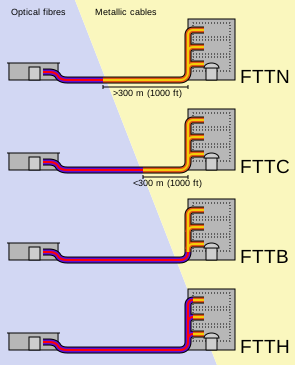
The best technology available. Fibre optic cable runs all the way from the exchange to your house (possibly via network nodes). This allows you to connect at the maximum speeds available and is generally the most reliable service.
FTTB: Fibre To The Basement
The next best option. Fibre optic cable runs from the exchange to the basement of your high rise building. It is then copper cable for the rest of the way to your apartment. The maximum speed available is 100/40. There are options to update to full fibre.
FTTC: Fibre To The Curb
The next best option. Fibre optic cable runs from the exchange through your street. There is an adaptor connecting to the fibre to your old copper phone line. This copper run is quite short and usually under 200 meters. The maximum speed available is 100/40. There are options to update to full fibre.
FTTN: Fibre To The Node
The next best option. Fibre optic cable runs from the exchange to a ‘node’ in your area. Your old phone line is then connected to the node. The distance of copper can be over 1km in length and this can affect your final speed significantly. The maximum speed available is 100/40. There are options to update to full fibre.
HFC: Fibre To The Basement
Fibre runs from the exchange to the cable transceiver which then sends the signal along coaxial copper cable. This method means everyone on HFC uses the same copper which means besides the usual slow downs people can experience during the evening rush you can also experience slowdowns when too many people are using the internet at the same time. Higher speeds are available, up to 2000/100. The limit is on the upload speed at 100Mbps. The is currently no upgrade to fibre option with HFC.